DELTA CONSOLE
Your client keeps their app.
You see it.
Most coaching software replaces the athlete's training environment with the coach's dashboard. Delta does the opposite: the athlete runs the same product they would have chosen for themselves, and you join it, with visibility and a way to propose changes they accept. One tab does change: your client's Coach is set off by default unless they choose to pay for Delta Plus as an in-app purchase.
01 · CONSENT, FIRST
The honest model is what makes the ask easy.
Your first practical problem is getting a client to agree. Delta's answer is the consent model itself: the athlete links with a code, sees exactly what a trainer receives before anything is shared, and can end it at any time. Body data never reaches a trainer; there is no setting that shares it.
1 · CODE
You give the athlete a code. Nothing moves yet.
2 · PREVIEW
They see the exact scope of what you will receive, then accept or refuse.
3 · REVOCABLE
They can end the link at any time, from their own Settings.
02 · THE CONSOLE
Three altitudes, one question each.
Roster, then a client's training day by day, then a single lift's detail. Every judgment on screen comes from the same computations the athlete's app runs; the console adds altitude, not arithmetic.
ALTITUDE 1 · ROSTER: WHO NEEDS A LOOK
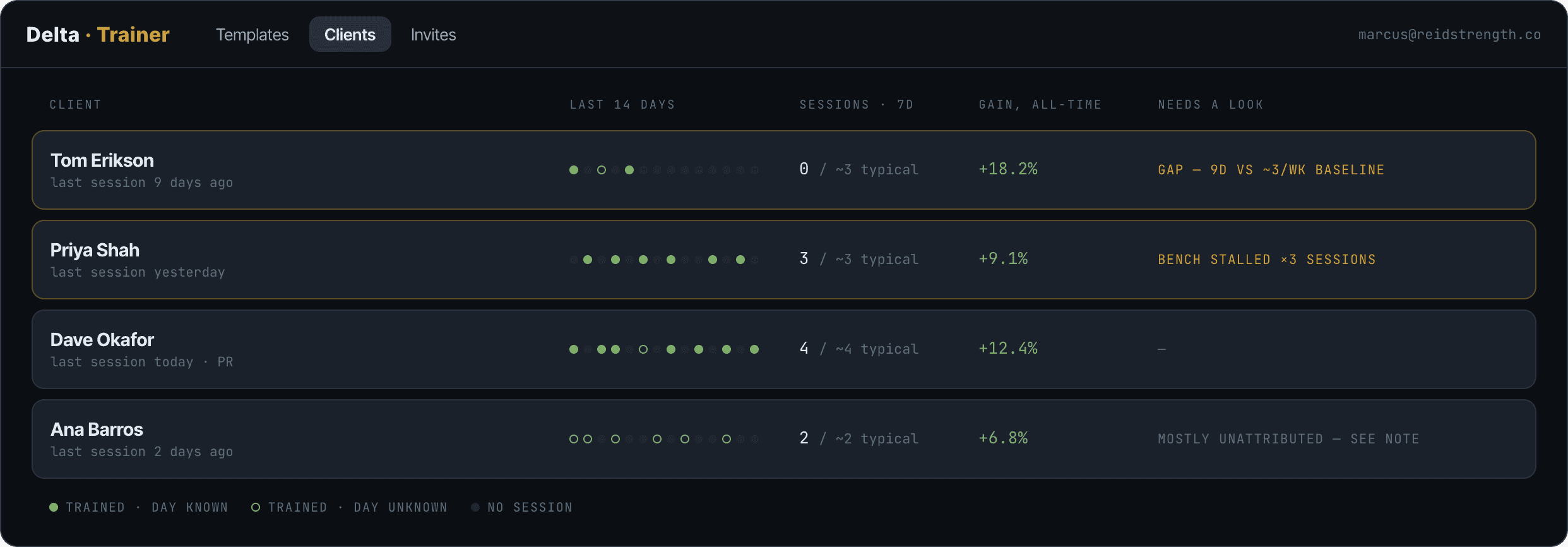
Attention is a reason in words, never a score: a gap against the athlete's own baseline, a stalled lift. No composite grades.
ALTITUDE 2 · CLIENT: THE TRAINING, DAY BY DAY
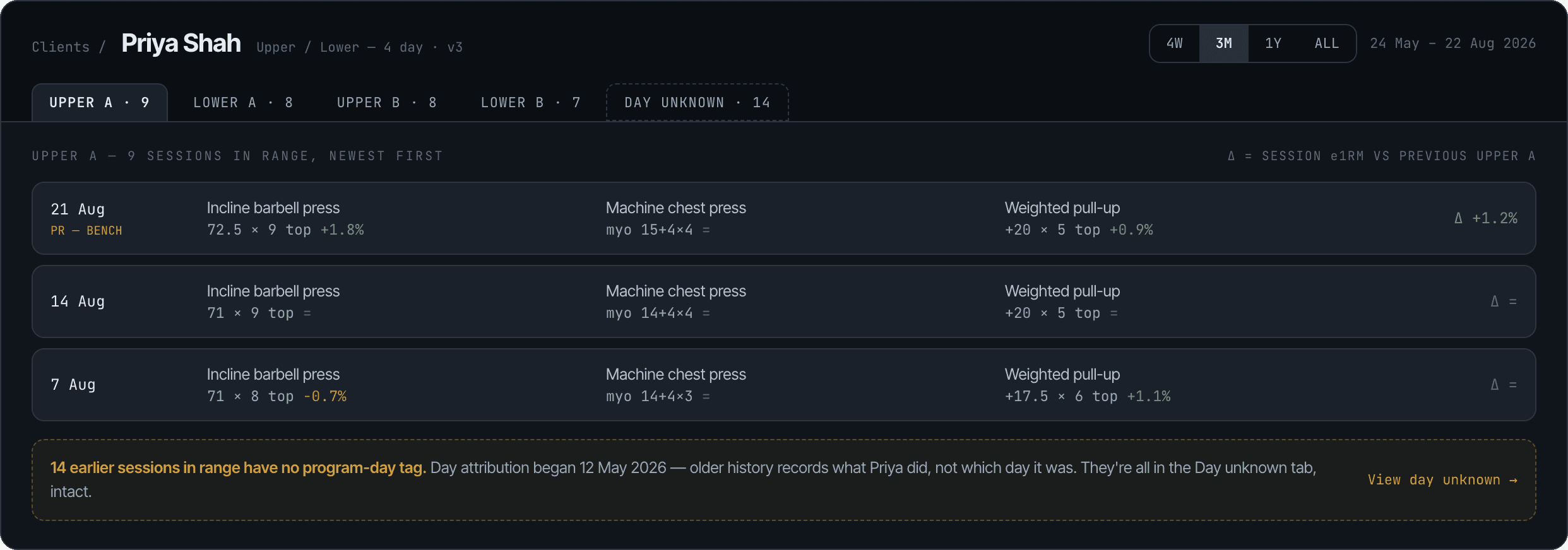
Sessions grouped by program day, newest first, with per-exercise deltas. History without a day tag stays visible as its own tab; it is never hidden and never called missed.
ALTITUDE 3 · LIFT: WHAT THE TREND SAYS
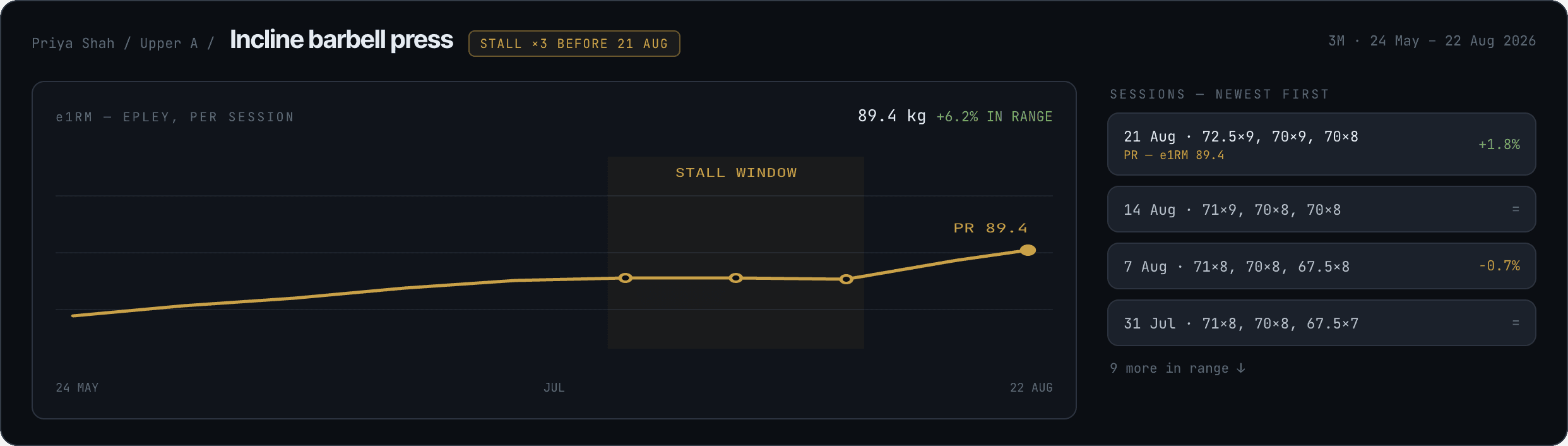
Estimated 1RM per session with PR and stall markers, and the raw sets one glance away. The chart adds position, not new math.
03 · PROGRAMMING
Your edits, their program.
Edits to an exercise the athlete hasn't customized apply on their own, and they always see what changed. Where they have made it theirs, or where you are removing an exercise, it reaches them as a proposal to accept or decline. That is a feature, not friction: an athlete who can decline is an athlete who stays engaged, and a declined change is information about the client.
PROPOSAL · UPPER A
Swap Incline Press for Machine Chest Press, 3 weeks
Reason: shoulder note from Tuesday. Loads carry from the backup's history.
Accept
Decline
As the athlete sees it, in their own app.
History arrives with the client.
On acceptance, the athlete's existing sessions backfill to the console. A new client is not a blank slate; their lineage, PRs and stalls are there from the first minute, labeled by when day attribution began. The client shown here is from the console's own sample roster, a different athlete than the demo log on the product page.
219SESSIONS OF HISTORY
DAY 1VISIBLE FROM
04 · SCOPE
What you can tell your client.
The right column is the sentence that gets a yes. Say it to them exactly; the app shows them the same list before they accept.
YOU SEE
Sessions and sets, by program day
Estimated 1RM trends, PRs and stalls
Training frequency against the athlete's own baseline
The program, its days and its methods
Estimated 1RM trends, PRs and stalls
Training frequency against the athlete's own baseline
The program, its days and its methods
YOU NEVER SEE
Body composition; no setting shares it
The readiness score or the signals behind it
Whether the athlete pays
Anything before they accept or after they end the link
The readiness score or the signals behind it
Whether the athlete pays
Anything before they accept or after they end the link
Logs are read-only in the console. The athlete's app is the record; you are a reader with a proposal channel.
05 · SEATS
A seat is access attached to a coaching relationship.
When a request is approved it comes with a limited number of seats, sized to your roster and raised later on request. A seat gives a client 90 days of the full app when they accept your invite. It is not a coupon you hand out, and three things about it are worth knowing before you promise anyone anything.
ALLOCATED, NOT LISTED
There is no fixed number. Allocation is decided when you are approved, from the size of the roster you describe in your request, and can grow with it.
ENDS WITH THE LINK
The 90 days begin when the client accepts and end the day the link ends, whichever of you ends it. Their programs and logged sessions stay; their access does not. The client sees this before accepting. You should know it before recruiting.
ONCE PER ATHLETE
The 90 days are granted once per athlete account, ever. A client who already had them, from a previous coach or a code, can still be linked; the seat adds no free time.
Seats are limited and requests are reviewed.